

10DLC SMS registration steps, cost and how long it takes
Register your business for texting in Tonet. The SMS Registration form step by step, what each status means, the 10DLC fees, and texting while you wait.
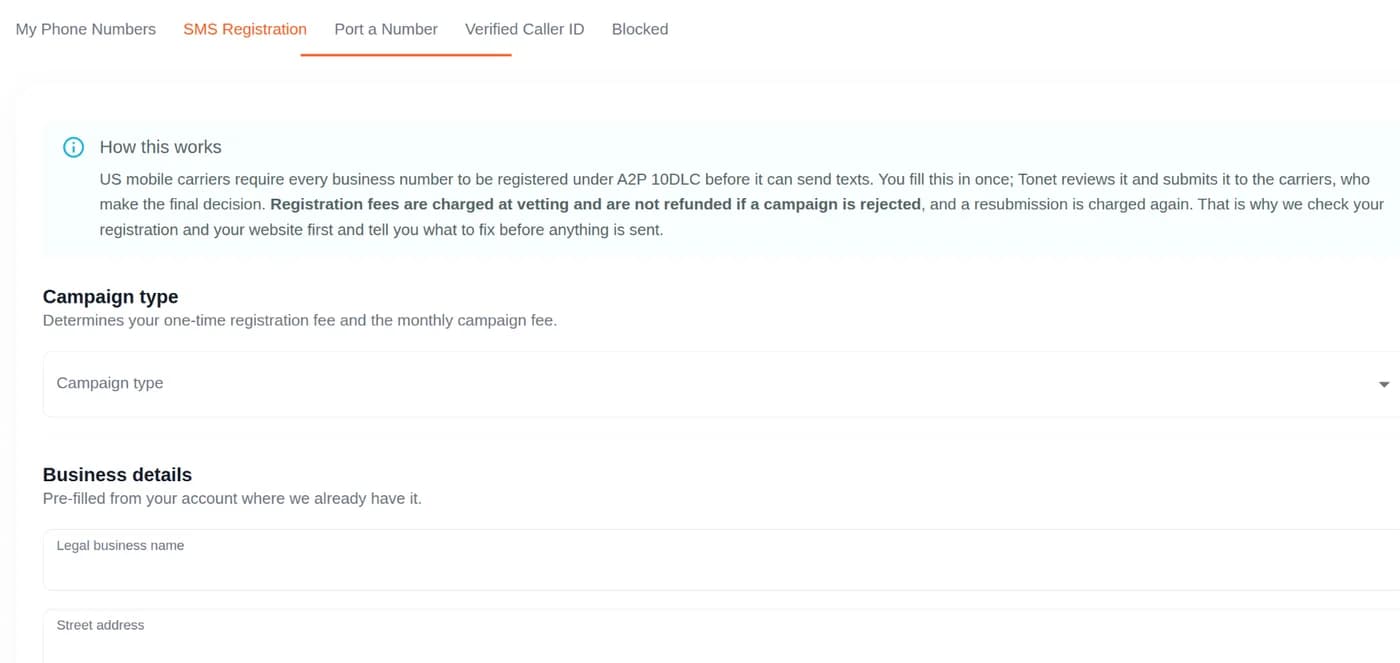
US carriers only deliver business texts from registered numbers. To text from a local Tonet number, register your business once in Manage › Phones › SMS Registration. Tonet checks your form, files it with the carriers, and emails you when it's decided. Carrier review usually takes a few business days. You pay one-time fees when it's filed, then a monthly fee.
Owners, managers and administrators can register. Regular users: ask one of them.
This registration is called A2P 10DLC: business texting from an ordinary 10-digit number.
Before you start
Have these ready:
- Your legal business name and EIN, exactly as on your IRS letter (the CP 575 or 147C letter).
- A website for your business that loads, with an about page, a contact page, a privacy policy and terms.
- How people agree to get your texts, for example a checkbox on your booking form.
- Two example texts you will really send.
Not sure what to write? Copy from What to write.
You can only register numbers you can use. If the tab says No numbers assigned to you, add yourself on the number's Permissions tab first. Owners and managers are added to new numbers automatically.
Register your business
- Go to Manage › Phones and open the SMS Registration tab.
- Pick a Campaign type. Its fees show under it. See What it costs.
- Check Business details. Tonet fills in what it already knows. The Legal business name and Employer Identification Number (EIN) must match your IRS records exactly.
- Fill in the Contact person: title, name, email and phone number.
- Under Campaign, enter your Estimated monthly volume, pick a Use case, and write the Campaign description, Sample message #1 and Sample message #2.
- Under Message content, tick everything your texts will include: links, phone numbers, lending, or age-gated content.
- Under Consent, fill in How do end-users consent to receive messages? Fill in Opt-in keywords and Opt-in auto-reply message only if people can sign up by texting you a word.
- Under Numbers, pick the numbers that will text.
- Read the list under Not permitted from local numbers and tick I confirm my messaging does not include any of the above.
- Check E-mail for notifications. Tonet sends updates there.
- Type your name in Type your full name to certify and click Submit.
Not finished? Click Save draft and come back later.
If something is missing or too short, Tonet lists it under Fix these before submitting and highlights the field. Nothing goes to the carriers until it's fixed.
At least one sample message must tell people how to opt out, like "Reply STOP to opt out." The form won't submit without it.
What it costs
| Campaign type | Monthly | One-time brand registration | One-time campaign vetting |
|---|---|---|---|
| Sole Proprietor | $2.00 | $4.00 | $15.00 |
| Low Volume Standard | $1.50 | $4.00 | $15.00 |
| Standard | $10.00 | $44.00 | $15.00 |
| Charity / 501(c)(3) Nonprofit | $3.00 | Not shown | $15.00 |
| Emergency Services | $5.00 | Not shown | $15.00 |
- Low Volume Standard is for a mix of uses, up to 2,000 SMS segments and MMS a day to T-Mobile customers.
- Standard covers every use case on the form.
- Charity needs proof of nonprofit status. Emergency Services needs proof of emergency service designation.
- The form shows your account's exact prices when you pick a type.
When you pay:
- One-time fees: when your registration goes to the carriers for vetting. They aren't refunded if it's rejected, and a resubmission is charged again.
- Monthly fee: on the 1st of each month once your campaign is approved. It shows in Billing as SMS registration (monthly).
- Texts: 3¢ each on both plans, on top of these fees. See plans and prices.
Sole proprietors
The Sole Proprietor type is $2.00 a month, with a $4.00 brand registration and $15.00 vetting. It allows one campaign per brand.
- Tonet's form needs an EIN for every registration, Sole Proprietor included.
- The carriers' Sole Proprietor type is for people without an EIN. If your business has an EIN, they expect Low Volume Standard or Standard.
- No EIN? Email support@tonet.ai before you submit.
How long it takes
- Submitted: Tonet checks your form and your website before anything is filed.
- Under review: the carriers vet your campaign. This usually takes a few business days. A brand sent to manual review can take 7 business days or more.
- Approved: Tonet emails you. Text from a number once its card shows Texting approved.
Charity and emergency registrations may need extra approval from the carriers. Still Under review after two weeks? Email support@tonet.ai.
What each status means
| Status | What it means | What you do |
|---|---|---|
| Draft | Not submitted yet | Click Continue filling in |
| Submitted | Tonet is checking it before it goes to the carriers | Nothing |
| Under review | The carriers are vetting it | Nothing |
| More information needed | Tonet support needs something from you | Read the message. Answer under Messages and click Send reply, or click Edit and resubmit |
| Approved | Your campaign is registered | Text from numbers that show Texting approved |
| Rejected | It wasn't approved. The reason shows under Reason for rejection | Fix it and click Edit and resubmit. See Registration rejected |
When you answer under Messages, you can click Attach files to add a screenshot of your opt-in form or anything else support asked for. Your registration then goes back to Under review.
Tonet emails your E-mail for notifications when it needs something from you, and when your registration is approved or rejected.
Texting while you wait
- Calls, voicemail and team chat work as usual. Texts people send you still arrive.
- On Manage › Phones, a number that can't text yet shows Texting not approved.
- In Messages, if none of your numbers can text yet, the message box shows Pending Carrier Verification where the number goes, and you can't send. A new SMS conversation shows Pending carrier verification next to From:. Point at it to see why, or click it to open SMS Registration.
- If some of your numbers are approved, only those appear under From:.
Carriers block texts from unregistered numbers, so Tonet doesn't send them.
Add a number later
A number you buy after registering can't text until it's added to your campaign.
- If SMS Registration shows Numbers not yet enabled for texting, tick the numbers and click Request texting on (the button counts the numbers you ticked). Tonet support adds them. There's no new vetting fee and no form to fill in.
- Otherwise, email support@tonet.ai with the numbers to add.
Toll-free numbers
This registration is for local numbers. Texting from a toll-free number needs a different carrier check, called toll-free verification, which this form doesn't do. It can take days to weeks. Email support@tonet.ai to ask about texting from a toll-free number. More about toll-free numbers.
Next steps
- What to write: descriptions, sample texts and opt-in wording to copy.
- Registration rejected: why it happens and how to fix it.
- Texts not delivered: what to check.
- Phone numbers: buy a number or choose who can use it.
Meetings
Start or schedule a meeting in the dashboard, invite teammates and outside guests, share your screen, and let Tonet AI keep the action items and wrap-up.
What to write
Campaign descriptions, sample messages and opt-in wording to copy into Tonet's SMS Registration form, with templates for common businesses.