

Tonet AI: call transcripts, summaries, leads and tasks
Tonet's AI transcribes and summarizes every recorded call, finds next steps and cold leads, coaches your team, learns your answers and does tasks for you.
Tonet's AI listens to your recorded calls after they end. It writes down what was said, sums each call up, tags it and finds what was promised. Across all your calls, it spots leads going cold and what callers keep asking. It learns how your business answers, and does tasks in your account when you ask it to.
There's nothing to set up. It works on every recorded call, in the dashboard, the desktop app, desk phones and the phone app.
- 0:00Front DeskThanks for calling, this is the front desk. How can I help?
- 0:05CallerHi, my AC is blowing warm air. Can someone come take a look?
- 0:12Front DeskSure. Is this for a home or a business?
- 0:16CallerHome. What does a visit cost?
- 0:21Front DeskA diagnostic visit is $89, and it goes toward the repair if you go ahead.
- 0:30CallerOK. Do you have anything this week?
- 0:34Front DeskThursday at 10 AM is open. Want it?
- 0:38CallerYes, Thursday works.
- 0:41Front DeskBooked. I'll text you a confirmation with the address we have on file.
- 0:48CallerGreat, thanks.
After every call
| What Tonet does | Where you see it |
|---|---|
| Writes down every word, with who said it and when. Card numbers, Social Security numbers and PINs are hidden. | The transcript on a call's page |
| Sums up the call in a few sentences, with Sources: the moments it's based on | Call review on the call's page, and one line in Calls |
| Lists next steps that were agreed. One click makes a task or a calendar event. | Next steps in the call review |
| Suggests tags for the call, like "booking". Keep the ones you like. | The after-call review |
| Marks moments on the recording: a price said, a next step, a transfer, both talking at once | The talk bars above the transcript |
| Translates the transcript into English, Spanish, French, Portuguese, Tagalog, Hindi, Arabic, Chinese, Vietnamese, German or Swedish | Translate on the call's page |
| Writes voicemails out as text | Voicemail and the bell |
| Flags robocallers, with Block number right there | The after-call review |
Across all your calls
| What Tonet does | Where you see it |
|---|---|
| Finds leads going cold: someone who asked for a quote or a call back in the last 30 days and hasn't heard from you for 7 days | What Tonet noticed on Overview |
| Spots what callers keep saying: questions, objections, competitors and complaints that came up with at least 3 callers this week | What Tonet noticed |
| Coaches each person: their strongest habit and biggest gap this week, out of five (introducing themselves, asking about needs, answering objections, proposing a next step, confirming details) | What Tonet noticed, under Coaching |
| Listens for your topics: up to 20 things you care about, like "Asked about financing". Tonet tags the calls and counts them. | What to listen for on calls, in your AI settings |
| Learns your answers: what your team tells callers, your hours and menus, and your website | Knowledge |
During a call
Calls in the dashboard and the desktop app open in the live call view, a full page where Tonet works alongside you while you talk.
✦ Tonet fills these as you talk · × removes
- Calling about
- AC blowing warm air, at home
- Quote
- $89 diagnostic visit, goes toward the repair
- When
- Thursday, 10 AM
- Promised
- A confirmation text with the address
- Next step
- Text the confirmation
- Call tags
- booking · AC repair
- YouThanks for calling, this is the front desk. How can I help?
- CallerHi, my AC is blowing warm air. Can someone come take a look?
- YouSure. Is this for a home or a business?
- CallerHome. What does a visit cost?✦ AnswerA diagnostic visit is $89. It goes toward the repair if they go ahead.Knowledge · what your team tells callers
- YouA diagnostic visit is $89, and it goes toward the repair if you go ahead.
- CallerOK. Do you have anything this week?
- YouThursday at 10 AM is open. Want it?
- CallerYes, Thursday works.
- YouBooked. I'll text you a confirmation with the address we have on file.
- CallerGreat, thanks.
Call ended. Tonet checks it in about 40 s, against the recording.
| What Tonet does | Where you see it |
|---|---|
| Writes the call out as you talk, line by line | The live transcript in the middle of the page |
| Fills in the call's details as it hears them: what they're calling about, what was promised, a quote, the next step | This call, on the left, marked ✦ |
| Answers the caller's question beside it, from Knowledge, or looks it up | On the right, level with the question |
| Sends a text when you type "text them …" in the note box, with Undo for 5 seconds | The box at the bottom |
| Says what they're probably calling about: something promised on an earlier call, an open task, or the last call | Probably calling about on the call card. See your call card. |
| Shows your last conversations and open work with them | The call card |
| Writes a note for the person you transfer to: who's calling, what they need, what was promised | Transfer › Tonet wrote this · edit |
| Checks its notes against the recording after the call, and says what it corrected | Tonet's check, after the call |
In meetings
Meetings are voice meetings in the dashboard, with screen sharing and outside guests. Tonet AI comes on by itself: it writes down what's said, adds the action items you agree on, and answers when you type @Tonet or say "Tonet," out loud. When the meeting ends it posts a Wrap-up: what was decided, who does what, and what's still open. One click turns the open items into tasks. Tonet pays for it.
Whenever you ask
Ask Tonet is the chat at the bottom right of the dashboard. It answers questions about Tonet for free, and it can work in your account:
- Searching this week’s calls for prices
- Reading the matching transcripts
- Mon 10:12 AM(555) 010-0142“What does a visit cost?”
- Tue 3:47 PMFront Desk → (555) 010-0187“Is the $89 credited if we go ahead?”
- Thu 9:05 AM(555) 010-0163“Do you charge extra on weekends?”
It can find calls by what was said, count missed calls, text your customers (one person or up to 5,000 at once, from a number registered for texting), change where a number's calls go, make schedules and teams, add contacts and tasks, and write emails and replies. It can't buy numbers, take payments or delete users. See what Ask Tonet can do.
What Tonet's AI reads
| Reads | Never reads |
|---|---|
| Recorded calls and voicemails | Your team chat, unless someone allows it in Ask Tonet |
| Texts with your customers | Calls made while AI was off, even after you turn it back on |
| Your settings, contacts, tasks and notes |
Transcripts are made on Tonet's own servers. Summaries, tags and answers are written by an outside AI provider. Knowledge leaves out passwords, PINs, card and bank numbers, Social Security numbers and health details.
A call needs a recording for any of this, and a summary needs at least 30 seconds of talking. Calls that aren't recorded get no transcript, summary or tags.
What it costs
Most of it costs nothing. Tonet pays for transcripts, summaries, tags, translations, voicemail text, What Tonet noticed and what Knowledge learns.
What you ask for yourself uses your account's included AI credit: Ask Tonet's tasks, and web look-ups Tonet makes during a call. Every month the account gets $5, plus $2 for each active person. Getting help with Tonet in Ask Tonet is always free.
When the credit runs out, those pause until it renews next month. The owner can turn on Keep AI running after the included credit and set a Monthly cap: extra use then comes out of your balance, never more than the cap.
Turn it off, or cap it
Owners and managers control AI for the whole account in Knowledge › Your business (or Manage › Account › AI on accounts without Knowledge):
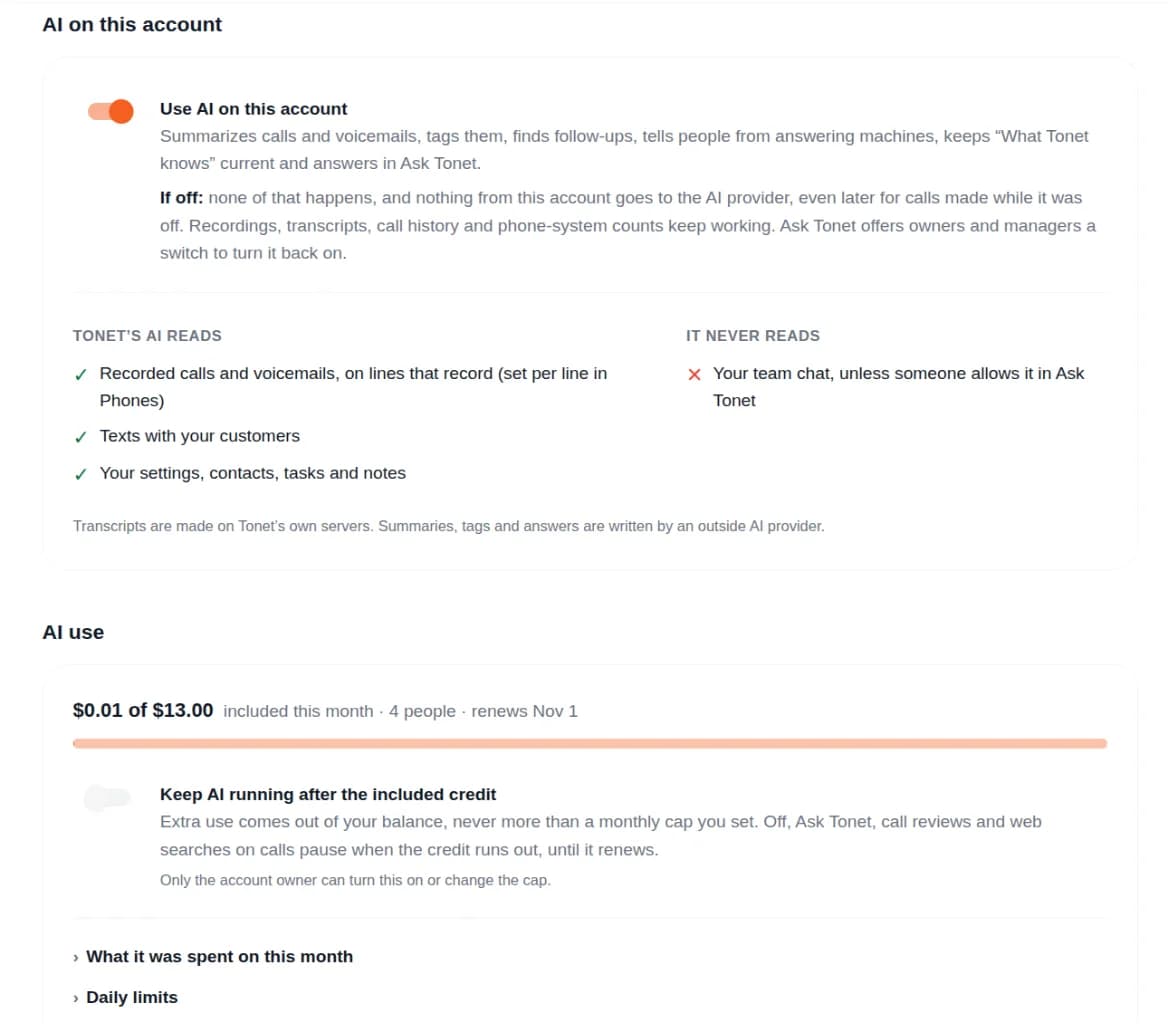
- Use AI on this account turns it all off or on. Off, summaries, tags and Ask Tonet's tasks stop for everyone, and nothing from your account goes to the AI provider. Recordings, transcripts and call history keep working.
- AI use shows how much of this month's credit is used, and What it was spent on this month.
- Daily limits are a safety net under the credit: a cap per day for the whole account and for each person. They reset at midnight Eastern.
- Call review in Manage › Account › Calls turns summaries off on their own, or sets whether Tonet fills tags in or only suggests them.
See Change AI settings.
Next steps
- A call's page: the transcript, summary and translation of one call
- Ask Tonet: get help, or have Tonet do a task
- Knowledge: what Tonet knows about your business
Android
Install Tonet on Android, turn on Unrestricted Battery and Full-Screen Calls so calls ring when the app is closed, and fix a phone that doesn't ring.
Ask Tonet
Ask Tonet is the chat button at the bottom right of the dashboard. Get answers, have it do tasks in your account, or talk to Tonet's support team.