Call Monitoring
Call monitoring lets managers and owners listen to live calls in real time, or privately coach team members during a call without the caller hearing. It works directly from the Overview page - no extra setup required.
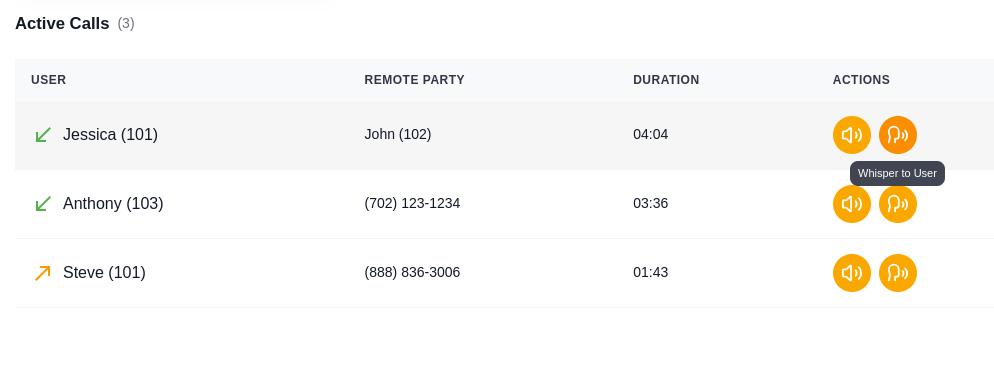
Active Calls Panel
The Active Calls panel appears on the Overview page below the communications feed. It shows every call currently in progress on your phone system:
- User - Which team member is on the call
- Remote Party - The other party's phone number
- Duration - A live counter showing how long the call has been going (HH:MM:SS)
- Actions - Listen In and Whisper buttons
Listen In (Silent Monitoring)
Click the Listen In button on any active call to silently monitor the conversation. You hear both sides of the call, but neither the team member nor the caller can hear you.
A status bar appears at the top of the page showing "Currently Monitoring: Listen [user name]" with a stop button to disconnect at any time.
Use cases:
- Quality assurance - review how your team handles customer calls
- Training - observe new employees during their first calls
- Dispute resolution - listen to a call in progress when a customer escalates
Whisper (Private Coaching)
Click the Whisper button to speak privately to your team member during a live call. You can talk to them, but the caller cannot hear you.
Use cases:
- Coach new employees through difficult calls in real time
- Provide pricing or policy information to a rep without putting the customer on hold
- Guide a team member through an unfamiliar process
No setup required. Call monitoring works out of the box for managers and owners. Regular users cannot see the Listen In or Whisper buttons - they only see their own active calls.
How It Works
- Go to the Overview page
- Look at the Active Calls panel - it shows all calls currently in progress
- Click Listen In to silently monitor, or Whisper to privately coach
- The monitoring status bar shows what you're monitoring and lets you stop at any time
- You can switch between Listen In and Whisper during the same call